From the October 21st, 2026, edition of How Teams Work
When I open a new client’s HubSpot portal for the first time, I like to get a sense of how the team is actually using it.
One of the spots we check is whether they’re using HubSpot credits.
Every organization uses HubSpot differently. But one trend I keep noticing is that a lot of companies aren’t using the credits that are included with their plan.
For a while now, HubSpot plans have included a set number of credits each month. If you don’t use them, they expire.
Credits have become a bigger part of how HubSpot works. When they were first introduced, they powered data enrichment. Now they also run many of HubSpot’s new agents and the AI-powered automation across the platform.
If your team isn’t using the credits already included in your plan, not only are you missing out on the value of the tools they power, but you’re also leaving money on the table.
So in this issue, I’ll walk through what credits are, what they can do, and how to start putting them to work.

Why HubSpot started charging for the work
The way I think about it, HubSpot split the bill in two.
- Seats pay for the people.
- Credits pay for the work.
Sound familiar? Almost every SaaS tool now has some form of credits, where you pay based on the amount of work it does.
Many of HubSpot’s first agents launched as free tools to get people using them. Over time, HubSpot started requiring credits to run them. AI actions in workflows went the same way.
That can be frustrating, especially if your team used the early versions for free and now has to pay for them.
But these features take extra computing power every time they run, and most AI tools on the market charge the same way. Automation tools like Zapier and Make have used credits for a while to capture this.
And HubSpot is only going further in this direction. It recently rolled out a new pricing model in EMEA that leans even more on usage-based pricing. It hasn’t reached North America yet, but it’s expected to come soon.
We’re keeping a close eye on it, and we’ll cover it in a future issue once we know more about how it will roll out here.
In the meantime, the credits already in your plan matter. They’re a low-risk way to learn how your team uses AI in HubSpot, and what it’s worth, before more of your bill works this way.

What your credits pay for today
Here are the main ways teams use credits today, starting with the ones we see most.
The customer agent is the most common. It handles support conversations across chat, email, and messaging, answering from your knowledge base and website content, and it hands off to your team when someone needs a person.
The knowledge base agent works alongside it, drafting new help articles based on the questions coming in. As your knowledge base grows, the customer agent has better answers to pull from.
The prospecting agent is a close second. It researches accounts, finds the right contacts, and drafts personalized outreach using buying signals and the engagement history already in your CRM. Reps can review each email before it goes out, or let the agent send on its own. That matters most when volume is high, and reps are short on time.
The data agent fills in and enriches information on your CRM records. You give it a prompt, and it pulls answers from the web, the company’s website, or the calls, emails, and notes already on the record. It can research details, summarize what’s been said, or classify records, then write the result into a property. Since no customer or prospect is waiting on it, it’s one of the easiest places to start using credits.
AI actions in HubSpot workflows also use credits. They let you add AI as a step in a workflow, like summarizing a record, researching company news, or filling in a property. Workflows can also hand work to an agent, like running the data agent on a record or assigning a conversation to the customer agent.
Then there are custom agents, which you build around your own processes. You give them instructions, the tools they can use, and the knowledge they should draw on. You can run them on demand, inside a workflow, or from Breeze Assistant. They’ve improved a lot over the past several months. Reporting is an easy place to start with these, like a pipeline review agent that drops a custom report in your team’s inbox every Monday.
Beyond these, credits power a growing list of other features, including agents for nurture emails, marketing content, and invoice follow-up, plus a buyer intent tool that flags signals at companies that fit your ICP.

Your credits are going to waste
Your plan includes credits every month, whether your team uses them or not. Whatever goes unused expires, and that’s value included in your subscription that your team never gets.
Professional plans include 3,000 credits a month, and Enterprise plans include 5,000. To see how many of yours actually get used, go to Account & Billing, then Usage & Limits.
Across the companies we work with, credits go unused more than you might think.
Some of that comes down to uncertainty. Even though the credits are included, teams worry that once they start using them, they’ll end up paying for more. They aren’t sure how usage is counted or what happens when they hit their limit, and the rules keep changing. So they hold off.
A lot of it comes down to first impressions. HubSpot’s early AI tools were underbaked. Plenty of teams tried the first versions, weren’t impressed, and moved on. They never came back to see how much has changed. If that’s your team, it’s worth another look.
And the cost isn’t just the credits. It’s what your team isn’t learning. The credits are already there, so this is the cheapest time you’ll get to experiment, test, and see where AI fits into how you work. If you aren’t using AI to solve problems differently, you’re falling behind.

Where to get started
Like most things, figuring out how to get started can be the hardest part.
Pick something your team already does every week, and start there. You don’t need a big AI project to start using your credits.
Keep it small. Run it, see what comes back, adjust, and run it again. That’s how you figure out where AI actually helps your team and where it doesn’t.
Use HubSpot’s pre-built agents before you build anything custom. They only need some light configuration, which makes them an easier way in if building your own agent feels intimidating.
If the data agent is your first step, pick one recurring data issue, set a limit, and let it run. It’s also a good use for credits near the end of the month, before they expire.
For prospecting, start with a small group of contacts instead of a broad campaign. Learn how the agent behaves and what you’d want to change before you roll it out to the whole team.

How to keep credit costs under control
Once your team starts using credits, the next step is making sure you don’t spend more than you planned. That means putting the right guardrails in place before anything runs.
One recent example of why guardrails matter was the introduction of smart properties. When they launched, they caused a lot of concern in the HubSpot community. Each record a smart property fills uses credits, so running one across your whole database could leave you with a bill you never saw coming.
My rule is simple. Set the cap first.
A good starting point is a limit that matches the credits already included in your plan. Your team gets to use what you’re paying for, and you don’t spend more until you know which use cases deserve it.
HubSpot gives you the controls to do this. You can set limits for the whole account and for individual features, and HubSpot sends alerts as you approach your limit at 75%, 85%, and 90%. If you run out and don’t have additional credits, those features pause until your credits reset.
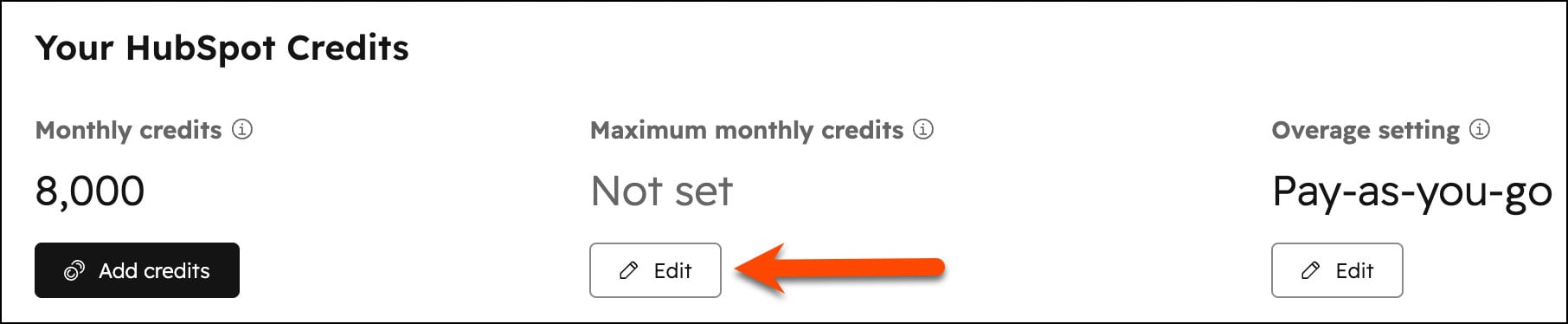
It’s also worth knowing what happens if you go over. Depending on your settings, HubSpot either raises your limit for the rest of your contract or bills you pay-as-you-go for the extra usage. It’s the same kind of surprise many teams got when they went over their marketing contact limit, and HubSpot moved them to a higher tier. Check this setting now so it doesn’t happen with credits.
Limits only go so far, though. The other guardrail is being deliberate about what you run. Does an agent need to run daily, or is weekly fine? Does the data agent need to touch a 50,000-contact database, or just one segment?
As your team adds more agents, you’ll need a plan for how credits get split between them. HubSpot lets you set limits by agent or feature, so you can divide credits however makes sense. Over time, credits will get budgeted by use case, the same way teams budget for software or headcount.
To decide how many credits each use case should get, compare what it costs with the time it saves. Say a reporting agent has your weekly report ready by Friday, which gives someone two hours back for campaign planning. That’s the kind of comparison your CFO will want to see, and it’s what makes the case when you need more credits.

How we help clients use their credits
When we help clients put their credits to work, we start with a specific use case, prove it out, and build from there. Here are a few examples of how we helped clients make use of their credits.
One client’s sales reps kept getting spam and vendor pitches that slipped past form filters. We built an agent that scores each lead before it reaches sales. Clear spam gets pulled out automatically, and borderline cases go to a person for review. Now reps spend less time sorting through junk submissions and more time on leads that are ready to buy.
Another client needed help setting up their customer agent to work better with their product pages. They had more product information than the pages could hold, so we loaded the full details behind the agent. Now prospects can ask specific questions and get answers on the spot, without waiting on a rep.
For clients with large customer bases, we’ve built white space agents that look for cross-sell opportunities across existing accounts. The agent handles outreach to smaller accounts automatically and flags bigger opportunities for a rep.
None of these started as big AI projects. Each one began with a problem the team already had and credits that were already part of their HubSpot subscription. If you haven’t looked at what yours could be doing, now’s a good time to start.
If you want to talk through where your credits could make the biggest difference, my DMs are open.
Want to get the "How Teams Work" newsletter sent to your inbox? Subscribe Now.





![[Video] How to Use the HubSpot Credits You’re Already Paying For](https://www.processproconsulting.com/hubfs/PPC-MKT-HTW-Credits.jpg)