HubSpot just retired Commerce Hub and replaced it with Revenue Hub. That's not a rebrand. It's HubSpot finally tackling a problem every go-to-market team knows by heart.
Here's the problem:
- A rep closes a deal and moves on.
- Finance starts billing without knowing what was negotiated.
- Customer success walks into a renewal with no idea what the customer is actually paying or when the contract ends.
The context that mattered most disappears the moment the deal closes.
That's not a HubSpot problem. CRMs and billing systems have lived apart for as long as both have existed.
Revenue Hub is HubSpot's attempt to finally close that gap.
From Commerce Hub to Revenue Hub
Commerce Hub launched as HubSpot's answer to payments and basic invoicing. It did what it was designed to do: let teams collect payments, send invoices, and manage simple quoting without leaving the platform. For many teams, that was enough.
But for companies with recurring contracts, mid-term amendments, expansion motions, and SaaS businesses managing complex subscription lifecycles, the functionality was never robust enough to meet those needs.
Commerce Hub was a starting point, not a complete solution. Quoting sometimes lived in HubSpot, but billing, contracts, and payment history were managed elsewhere, leaving gaps that teams filled manually.
Recently, HubSpot retired Commerce Hub and launched Revenue Hub.
The rename is not only cosmetic. It signals a deliberate shift in what HubSpot is building: a connected revenue system that spans the entire lead-to-cash cycle, from first quote through renewal and expansion.
The Missing Piece: Revenue Context
Most go-to-market teams have strong customer context inside their CRM.
They know who the buyer is, what the deal history looks like, and where every open opportunity stands.
What has traditionally been missing is revenue context: what the customer is actually paying, what products they have, when their contract renews, and whether any invoices are outstanding.
That revenue context has often lived somewhere outside of HubSpot. In a billing platform that finance manages separately. In a spreadsheet that someone updates at the end of each month. The result is that each team is working from a different version of the truth, and nobody has the full picture when they need it most.
Revenue Hub changes that by bringing revenue context natively into HubSpot. When the full lead-to-cash cycle lives in one place, the silos that have historically separated sales, finance, and customer success start to collapse. Every team works from the same record.
That same context is now also accessible to HubSpot's Breeze AI tools. AI is only as useful as the data it can see. When Breeze can see not just customer activity but what was sold, what has been invoiced, and what is outstanding, it can do considerably more than it could before.
What’s Actually New in Revenue Hub
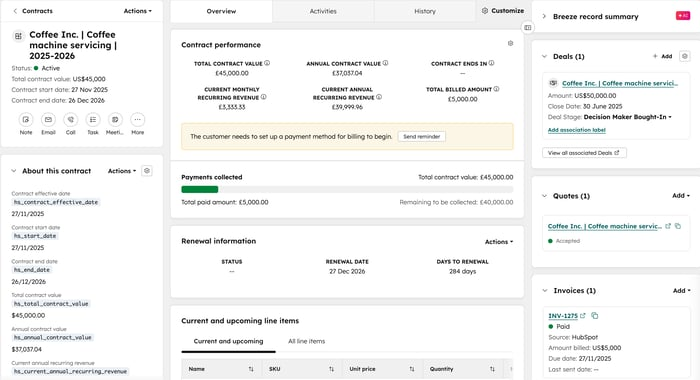
Revenue Hub is built around three connected pillars: CPQ, Billing, and Payments.
Each pillar existed in some form before. What is new is how they connect and what that connection makes possible inside the platform.
The most significant structural change across all three pillars is the introduction of the Contracts object.
Rather than the deal record going dormant after close, a Contract record is created that captures what was sold, the agreed terms, the effective and renewal dates, and calculated revenue metrics including ARR, MRR, ACV, and TCV.
It persists through every amendment, renewal, and billing action that follows. It is the connective tissue that makes the rest of Revenue Hub work.
CPQ (Configure, Price, Quote)
HubSpot's CPQ tool gives sales teams a native quoting tool built directly into the CRM.
Reps can build quotes from the deal record using a customizable quote editor, adding line items from the product library, setting discounts and billing terms, and attaching supporting documents. Quote templates give reps a starting point rather than starting with a blank page for every deal.
What is new with Revenue Hub is how Breeze AI is embedded throughout the quoting process. Reps now generate quote drafts from a simple prompt, write cover letters, adjust quantities, and get pricing guidance without leaving the quote.
Closing Agent, currently in beta, is a new buyer-facing chatbot that lets customers ask questions about a quote directly, pulling answers from the quote content and any attached documents. When a request needs rep involvement, the Closing Agent escalates to the quote owner automatically.
Billing
HubSpot's billing tools allow teams to manage invoices, track payment status, and sync financial data with accounting platforms like QuickBooks Online and Xero, all without leaving the CRM.
What is new with Revenue Hub is how the Contracts object connects directly to billing. That Contract record drives invoicing downstream, rather than assembling invoices manually after a deal closes, invoices are generated directly from the Contract, eliminating the manual translation that typically happens between the quote and the invoice.
Revenue Agent, currently in private beta, automates follow-up on overdue invoices. It uses customer context, including account age, risk, and value, to prioritize outreach, so the right accounts get attention first. Teams handle the exceptions while the agent handles the routine follow-up.
Payments
HubSpot's payments tools allow teams to collect revenue directly from quotes, invoices, and payment links without sending buyers to a separate system. Payment status flows back into the CRM automatically, giving every team a current view of what has been collected and what is outstanding.
What is new is how payments connect to the rest of the revenue lifecycle. Because payment collection is now tied to the Contract record, teams have a complete picture of what was sold, what has been invoiced, and what has been collected, all in one place.
Customer Agent also received new functionality that allows buyers to look up open invoices, pay outstanding balances, and complete purchases directly without needing to involve a sales rep.
Powerful, But Still Room to Grow
Revenue Hub introduces some genuinely exciting capabilities and signals a clear shift in how HubSpot is thinking about the revenue lifecycle.
That said, many of the limitations that existed in Commerce Hub have not gone away. Before evaluating whether Revenue Hub is the right fit for your team, it is worth knowing where the product still has ground to cover.
CPQ in Revenue Hub is best suited for teams with relatively straightforward quoting needs. Teams with more complex product catalogs or sophisticated configuration requirements may find the current toolset limiting. A guided selling experience, where a product configurator walks a rep through building a quote based on rules, constraints, and dependencies, is not available natively, though it can be achieved through custom configuration.
Contract generation and redlining are not native capabilities. If your sales process involves substantive contract negotiation, you will need to bring a CLM tool such as DocuSign, PandaDoc, or IronClad. HubSpot has indicated this integration is on the roadmap, but it is not available at launch.
Product bundles are expected to be available in Q3 2026. Price Books launched in beta and are expected to be widely available by the end of Q2 2026, though partner and channel tier support in the first version is unconfirmed.
Native payment processing is available in the US, UK, and Canada. Teams outside those markets can connect to an existing Stripe account, which is available globally.
EU-specific compliance features, including e-invoicing to certified standards and automated VAT and GST calculation, are on HubSpot's stated roadmap but are not available at launch. Teams in the EU with compliance obligations should factor this in before committing to Revenue Hub as a billing solution.
Teams coming from Salesforce CPQ-level complexity, or those with ERP integration requirements involving systems like NetSuite, SAP, or Dynamics, should evaluate carefully. Revenue Hub is not positioned as a replacement for that category of tooling. For those scenarios, purpose-built CPQ platforms that integrate with HubSpot remain the more appropriate path.
The Pro’s Perspective
We've spent years helping teams fix lead-to-cash inside HubSpot. We've watched the time and money teams lose reconciling quoting, billing, and payments across three different systems that were never meant to talk to each other.
Revenue Hub is the most serious move HubSpot has made toward owning that whole cycle. The Contracts object alone is worth paying attention to: a persistent record of what was sold and agreed, driving billing and reporting downstream. That's the kind of foundational fix that makes everything built on top of it more reliable.
Feeding that same context to Breeze matters just as much. AI is only as sharp as the data behind it. Give it visibility into what's sold, invoiced, outstanding, and up for renewal, and it starts doing real work instead of guessing.
The new agents chip away at the stuff that eats rep and ops time for no good reason: chasing overdue invoices, answering quote questions, handling payment lookups. Automate that, and your team gets that time back for work that actually grows revenue.
Revenue Hub isn't done. But the foundation is real, and the direction is right. HubSpot built the top of the funnel first. This is the clearest signal yet that it's building the back half with the same intent. If you've been waiting for HubSpot to close this gap, the wait is over, as long as you've got the right implementation behind it.
Need help evaluating or implementing Revenue Hub for your team? Contact the Pros.