From the August 12th, 2026, edition of How Teams Work
If you've been reading this newsletter for a while, you've probably noticed we talk about implementation a lot.
There's a reason for that.
Every day, we're talking to teams dealing with some version of the same problems:
- Leadership asks for a number and gets three different answers from three different people.
- A deal closes in the CRM, moves to a separate quoting tool, and lands in a spreadsheet for billing because none of the systems talk to each other.
- A workaround someone built eight months ago that nobody has touched since because there's always something more urgent to fix.
- Data that looked fine six months ago and is now a mess that nobody wants to take the time to clean.
- Everyone's got their own version of how to work inside of the system, because there’s no consistent process.
These problems are not going away. If anything, they're getting worse.
- Your team keeps growing.
- Your processes keep changing.
- Your tools keep evolving.
And most businesses are struggling to keep pace with all three at once.
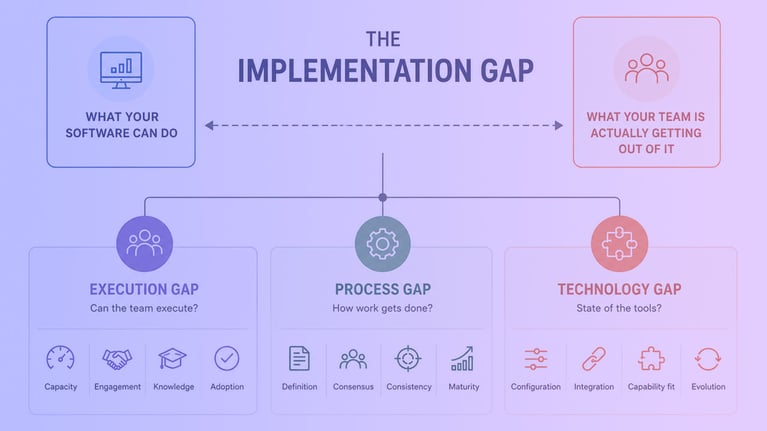
We put a name to this: the Implementation Gap. That gap between what your business is capable of and what your team is actually getting out of the tools and systems they rely on every day.

What is the Implementation Gap?
Most teams assume that once the system is live and the team is trained, the hard part is over. You close the project, move on, and come back when something breaks.
It's not that simple.
The distance between what your software can do and what your team is actually getting out of it doesn't close on its own. It continues to grow for as long as your business, your team, and your tools keep evolving.
That distance is what we call the Implementation Gap.
We broke it down into three areas where the gaps show up again and again, regardless of the team or the tools:
- Execution Gap
- Process Gap
- Technology Gap
We built this framework because we kept having the same conversation with customers, and we wanted a way to help them name what they were feeling. Because until you can name the problem, it's much harder to solve it.
Implementation never ends. Here's why that matters.
Most people think of implementation as their first project. You bought the software, you set it up, you went live. Implementation is past tense.
It's not. Everyone needs to redefine implementation.
As long as you own software, you're always implementing it. Every time your team grows, your process changes, or your tools evolve, the gap between what your software can do and what your team is getting out of it shifts. Sometimes the gap gets smaller. Most of the time, without anyone paying attention to it, it gets bigger.
That's not a failure. It's just the reality of running a business on software that keeps changing.
The teams that struggle aren't the ones with gaps. Every team has gaps. The ones that struggle are the ones that don't know how to name them.
That's what this framework is for.

The Execution Gap: Does your team have what it takes to keep things running?
This is about whether your organization, across sales, marketing, customer success, finance, and ops, actually has what it takes to do the work day to day. The bandwidth, the buy-in, the follow-through, and the expertise.
This isn't about anyone being bad at their job. It's the objective reality of your business's current size, maturity, and available expertise. Almost anyone dropped into that seat, under those same conditions, would run into the same wall.
What drives it:
- Capacity. The team doesn't have enough hands or time to do the work.
- Engagement. The people who need to make decisions don't show up and commit to them.
- Knowledge. Whoever is doing the work doesn't have the relevant expertise for the job.
- Adoption. Once something is built, the team doesn't keep using it the way it was intended.
What it looks like in practice:
- Nobody has time to keep the CRM updated, so it slowly stops reflecting reality.
- The person who needs to make a decision on how something should work keeps saying they'll figure it out later.
- Whoever is setting things up is learning as they go, because that's just who volunteered to get it done.
- The team got trained at launch and three months later is back to updating deals in their own personal spreadsheet.
The gap starts to close when the team has the bandwidth, buys into the decisions, brings the right expertise, and keeps using what got built beyond week one.
If any of these hit close to home, the tools probably aren't your problem.

The Process Gap: When nobody agrees on how things are supposed to work
This is about whether your business has a clearly defined, agreed-upon, and consistently followed way of operating, and whether that process has kept pace as the business has grown.
A lot of teams assume this means they have no process at all. That's actually rarely the case.
More often, a process exists. It's just never been fully agreed on or revisited as the business has grown. A process that was right at one size can quietly become the thing holding you back.
What drives it:
- Definition. The team is operating without a clearly defined process. Nobody has ever sat down and agreed on how things are actually supposed to work.
- Consensus. Decision-makers can't converge on one version of the rules. The target keeps moving before anything can get built.
- Consistency. The process isn't followed the same way by everyone. Each person runs their own version of the same process.
- Maturity. The process worked at one point. It just hasn't been revisited or updated as the business has grown.
What it looks like in practice:
- Ask five people how a deal is supposed to move through the pipeline and you'll get five different answers.
- Every time you get close to locking in how discounts or approvals should work, someone in leadership changes their mind.
- Everyone runs their own version of the process, so data is messy and reporting never quite adds up.
- The process made sense two years ago when the company was half the size. Now it's the thing causing friction and slowing everyone down.
This one closes when the business commits to one defined set of processes, decision-makers agree and actually stop moving the target, everyone follows it the same way, and it gets revisited as the business changes.
If this is you, more automation or more configuration won't fix it.

The Technology Gap: the tools themselves haven't kept up with what you actually need
This is about whether your tech stack actually matches where the business is right now. How each tool is configured, how they connect to each other, and whether they're capable of doing what you're actually asking them to do.
This isn't about whether your team has time to learn the tools. That's an execution problem. This is about the state of the software itself.
What drives it:
- Configuration. The tools aren't set up to reflect how the business actually operates. Workarounds and shortcuts have been layered on top of each other over time instead of being fixed at the source.
- Integration. The systems in your stack don't talk to each other. The same data lives in multiple places and matches in none of them.
- Capability fit. The tools are being asked to do something they were never built for, and it shows.
- Evolution. The setup hasn't kept pace with what the tools can now do. Features that could solve real problems are sitting unused.
What it looks like in practice:
- The sales team is manually copying deal information into a spreadsheet every month because the CRM and the billing system don't talk to each other.
- A new pricing model rolled out six months ago and the product library still reflects the old one, so reps are building custom line items on every quote.
- Leadership asked for a report on pipeline by region and it took three days to pull together because the data lives in four different places.
- The team built a workaround two years ago to handle something the tool couldn't do at the time. The tool can do it now. The workaround is still running.
This one closes when the tools are configured around your actual business, connected to each other, capable of doing what's being asked of them, and kept current as the platform evolves.
If this is where you land, the fix is architectural.

How these Gaps interact
The three gaps rarely show up in isolation.
- A leader who won't commit to a decision leaves a process undefined. That's an execution problem showing up as a process problem.
- A feature ships and the setup doesn't keep pace. That's a technology problem that now requires a process decision, which then requires someone to actually go execute it.
One change, all three pillars touched.
The symptom and the cause are rarely in a single place. What looks like a process problem is often execution underneath. What looks like a one-time technology fix usually requires a process decision and a team that actually follows through.
That's the point of naming the pillars. Instead of the gap staying a vague, hard-to-pin-down feeling, you can trace a specific symptom back to what's actually causing it.
Which one sounds like you?
Most teams recognize themselves in more than one of these. That's normal. The gaps don't operate independently, and neither do the problems that come from them.
We built this framework because we kept having the same conversations, and we wanted a way to help teams name what they were feeling. Because once you can name it, you can start to do something about it.
If you're on a RevOps team trying to get leadership to take this seriously, having language for the problem is half the battle. You can't fix what nobody agrees is actually broken.
And if you already know which gap you're dealing with, that's usually where we start too.
Want to get the "How Teams Work" newsletter sent to your inbox? Subscribe Now.